Everything the app does, screen by screen.
Recovery Co-Pilot is more than a clean-time counter. It’s a daily companion, a private place to reflect, a way to go to meetings together, a home for your sponsorship family and your Home Group service. At every step you’ll see what stays with you and what friends can see, because sharing is always your call.
In English and Spanish, including the daily readings.
A day with Recovery Co-Pilot
Your clean time and current Step are always on Home. Check in when you wake up, find a meeting, and check in again at night.
- Stays with you
- Your check-ins, notes and history.
- You can share
- Only what you decide to post.
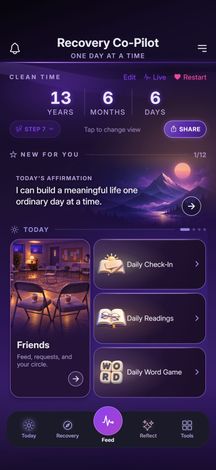
Step 1 of 3: Home keeps your clean time and current Step close, with Connection, Today, Reflect and Tools below.
- Your choice
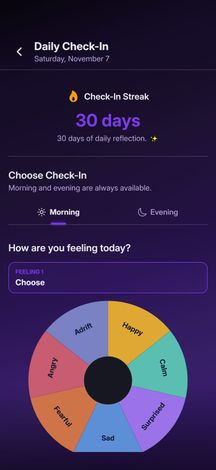
Step 2 of 3: Morning and evening check-ins: up to two feelings from the wheel, plus the day’s intentions or actions.
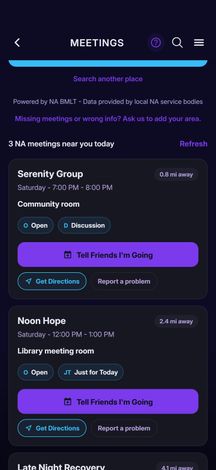
Step 3 of 3: Find NA and AA meetings near you, any day, with directions.
Step work stays in your notebook.
Every Step has its own private notes. Friends can see that you started a Step. They never see what you wrote.
- Stays with you
- Every Step note and its history.
- You can share
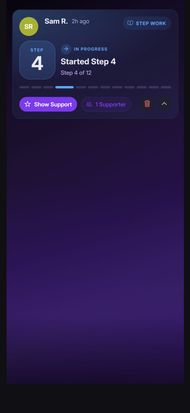
- “Started” or “finished”, if you turn Step-work sharing on.
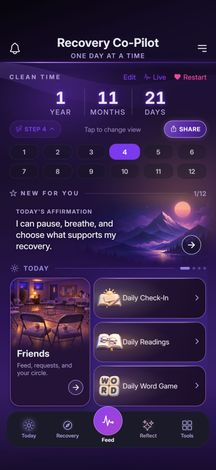
Step 1 of 3: Choose your current Step on Home. It opens that Step’s page.
- Private
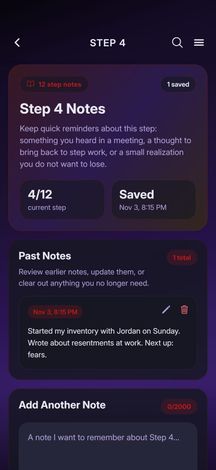
Step 2 of 3: Step 4’s own notebook. Write, edit or delete notes, newest first. A draft survives leaving the screen.
- Friends see this
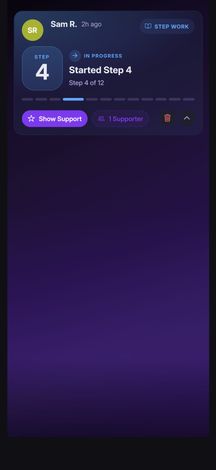
Step 3 of 3: With Step-work sharing on, friends see only that you started or finished the Step.
Ask for support, and answer privately.
A check-in you share can ask friends for support. They answer with a message, and you can reply privately. It isn’t a public comment thread.
- Stays with you
- Check-ins you don’t share.
- You can share
- A check-in you post, and its request for support.
- Friends see this
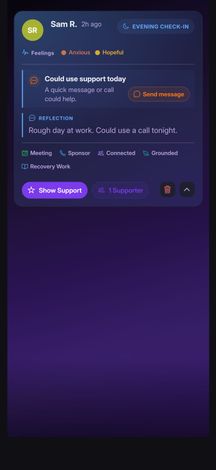
Step 1 of 5: A shared check-in that asks for support.
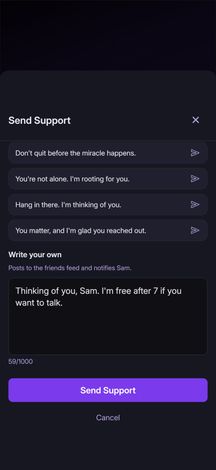
Step 2 of 5: A friend picks a supportive message or writes their own.
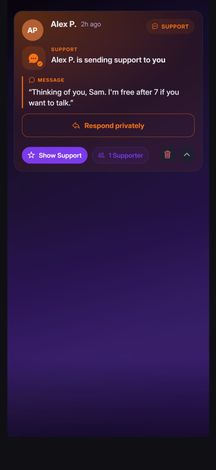
Step 3 of 5: Their message arrives on your check-in.
- Only the two of you
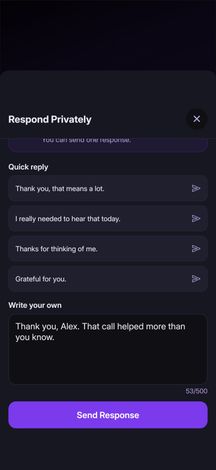
Step 4 of 5: You can send one private response.
- Only the two of you
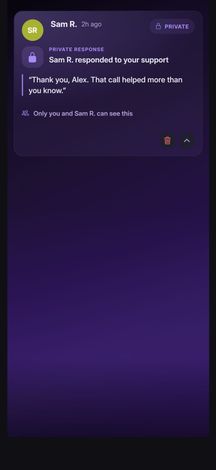
Step 5 of 5: Only the two of you see it.
Your check-ins become self-knowledge.
After enough check-ins, Pattern Insights reads back what keeps showing up in your own history, and Recovery in Review charts your week, month or year. They’re observations from what you recorded, not a score, a diagnosis or a prediction.
- Stays with you
- Your check-in answers, insights and Review charts.
- You can share
- One insight at a time, if you choose. Never your check-in answers.
- Your choice
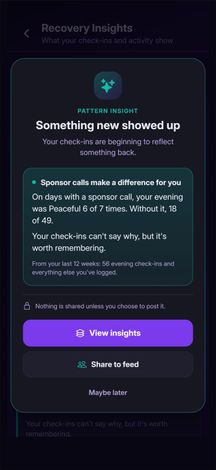
Step 1 of 5: A new pattern shows up privately first. Open it, or share that one insight.
- Private
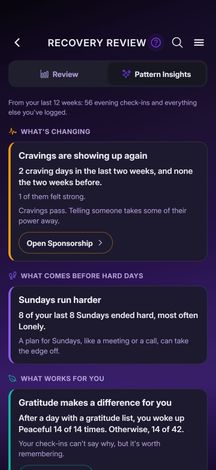
Step 2 of 5: Your insights live in the Pattern Insights tab of Recovery in Review.
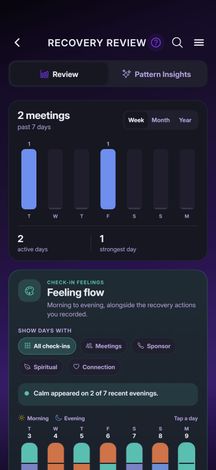
Step 3 of 5: The week in review: meetings, check-ins, sponsor contact, service, prayer and meditation, Step work, gratitude and more.
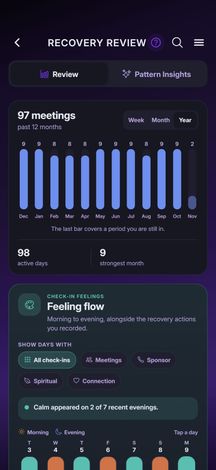
Step 4 of 5: Or the whole year.
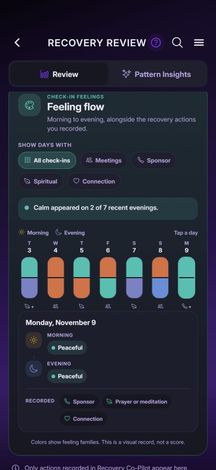
Step 5 of 5: Feeling Flow sets your morning feelings beside your evening ones, with the actions you recorded.
A full meditation practice, then your choice.
An open stopwatch or a 5 to 45 minute timer that stays accurate when the screen locks, with simple written guidance: Arrive, Breathe, Return.
- Stays with you
- Every session and your stats.
- You can share
- How long you sat, if you post it.
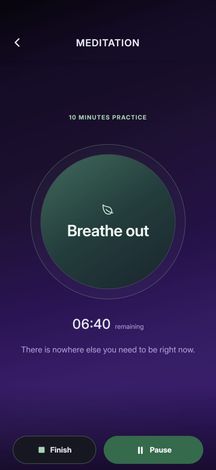
Step 1 of 3: A 10-minute sit, counting down.
- Your choice
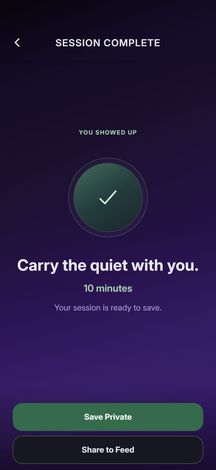
Step 2 of 3: When it ends: Save Private or Share to Feed. A Feed post shows the length only.
- Private
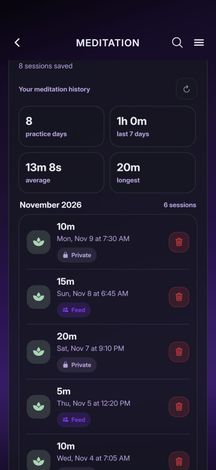
Step 3 of 3: Your history and stats: total time, practice days, the last seven days, average and longest.
Two gratitude tools, not one.
The Gratitude List is what you appreciate today. The Gratitude Challenge is what you’ll do tomorrow to act on gratitude. Both start with ten lines and take more.
- Stays with you
- Your lists and challenges, in one history you can edit.
- You can share
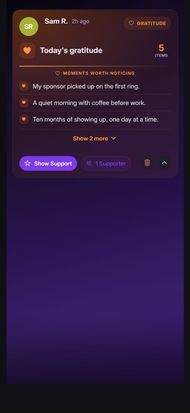
- A list or a challenge, when you post it.
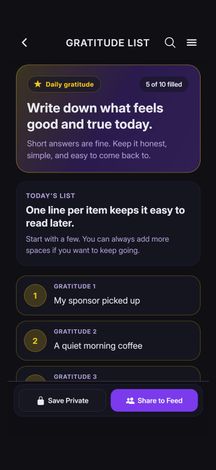
Step 1 of 5: The Gratitude List: what feels good and true today.
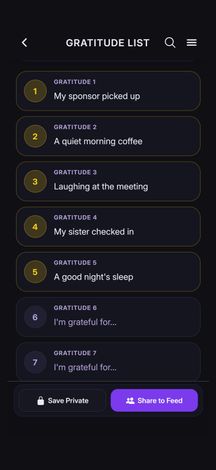
Step 2 of 5: Ten numbered lines to start. A half-written list comes back when you return.
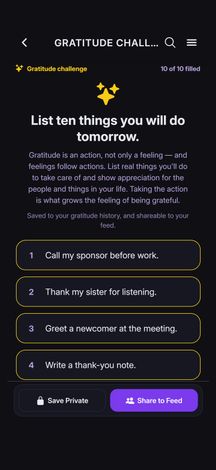
Step 3 of 5: The Gratitude Challenge: ten things you will do tomorrow.
- Friends see this
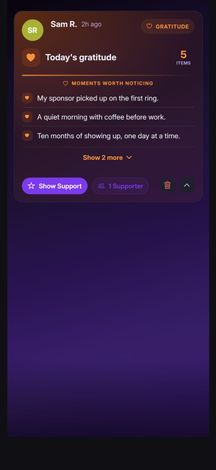
Step 4 of 5: Shared, a list becomes an expandable Feed card.
- Friends see this
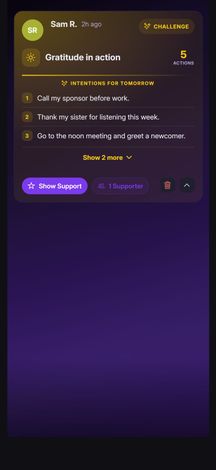
Step 5 of 5: A shared challenge reads as gratitude in action.
Find a meeting, then go together.
Search NA and AA meetings near you, make a plan and let friends know. They can tap I’ll Be There or Might Attend, or join your plan.
- Stays with you
- Your Meeting History.
- You can share
- A meeting plan, when you share it.
Step 1 of 3: Search nearby meetings by fellowship, day and distance.
- Your choice
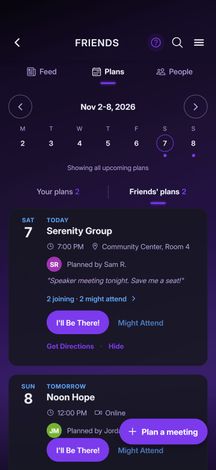
Step 2 of 3: Keep a plan private or share it. Friends see who’s going and who might.
- Private
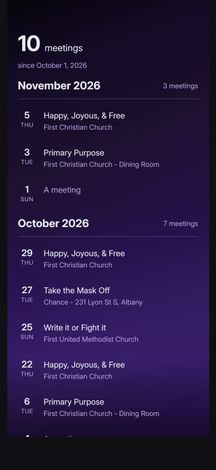
Step 3 of 3: Meeting History puts every meeting you’ve logged in one private list.
Progress without the competition.
Start a 90 in 90, log each meeting and watch the calendar fill. Meeting names, ratings and notes stay private. You can share the count.
- Stays with you
- Meeting names, ratings and notes.
- You can share
- Your count, and the finish.
- Meditation history, gratitude, journal and Step notes add up in your personal Recovery in Review.
- Habit and service awards mark what you’ve done without showing the entries behind them.
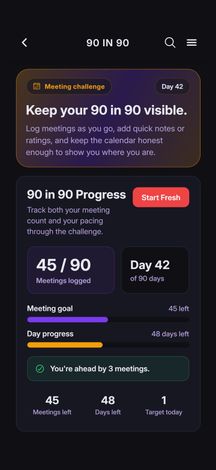
Step 1 of 3: Your pace and progress.
- Private
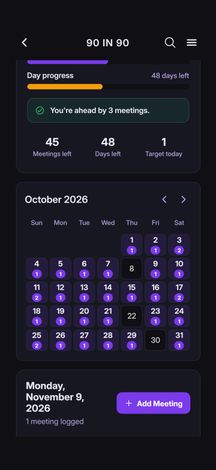
Step 2 of 3: A calendar of the days you made it.
- Your choice
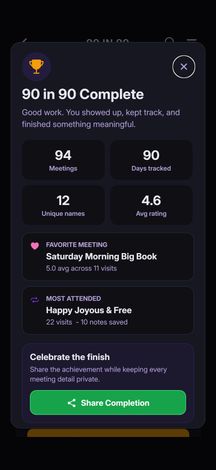
Step 3 of 3: Finish, and share the achievement if you want. The details stay yours.
Run Home Group service from the app.
Save your Home Group’s details, attendance and service commitments. Role pages for Treasurer, Literature, Secretary, GSR and more carry each month forward.
- Stays with you
- Your group’s records and monthly history.
- You can share
- An Area Report you email, or a summary you post to your Home Group chats. Contact details are blocked from chat posts.
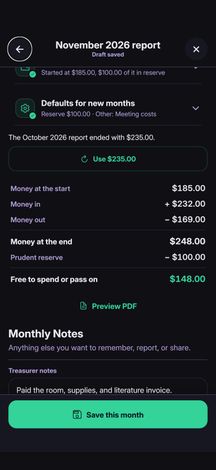
Step 1 of 4: Treasurer totals add themselves up, prudent reserve included.
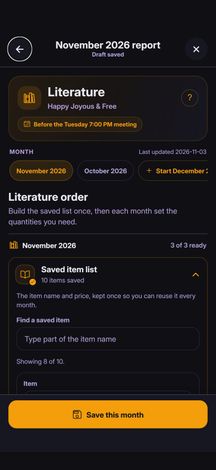
Step 2 of 4: Literature keeps a saved item list for each month’s order.
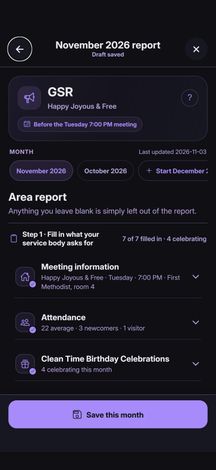
Step 3 of 4: The GSR’s Area Report fills in from your Home Group and Treasurer pages.
- Sent from your phone
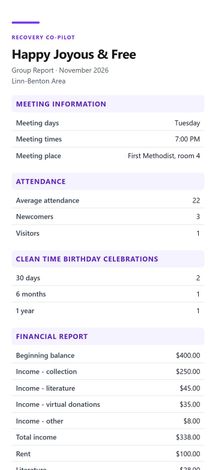
Step 4 of 4: It becomes a PDF that opens in your email app. Nothing sends until you tap Send.
Your sponsorship family, in one tree.
Keep your sponsor and their lineage, your sponsorship brothers and sisters, your sponsees and theirs, with private notes for each. Pan and zoom the whole tree.
- Stays with you
- Names, phone numbers, clean dates and private notes.
- You can share
- A tree image or contact list you send from your phone. Never the Feed.
- Private
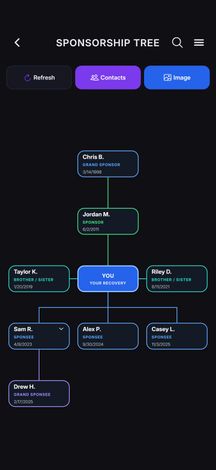
Step 1 of 2: The Sponsorship Tree: lineage above, sponsees below.
- Sent from your phone
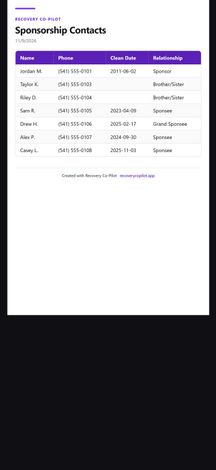
Step 2 of 2: With Premium, export the tree as an image, or the contact list as a PDF or CSV.
A nightly 10th Step that stays on your phone.
Do a Full or Express inventory, one question at a time. Your answers and notes stay encrypted on your device. Set a reminder, and export a finished inventory as a PDF or text.
- Stays with you
- Your answers and notes, encrypted on this device.
- You can share
- That you finished, and which type. With Premium, you can send answers to a private 10th Step Circle you choose.
- Premium: build your own inventories, and take turns choosing questions in a private 10th Step Circle.
- Private
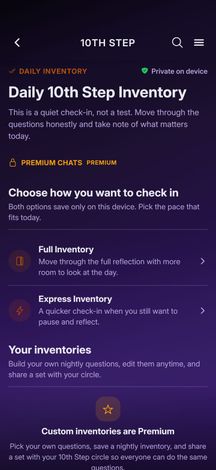
Step 1 of 1: Choose Full or Express. Both save only on this device.
A gentler way to start again.
Restart keeps a separate private count and journal for as long as you need, with a way to find a meeting. Move the new date to Home only when you’re ready.
- Stays with you
- Your restart count and journal.
- You can share
- An optional starting-over card, with or without the count.
- Private
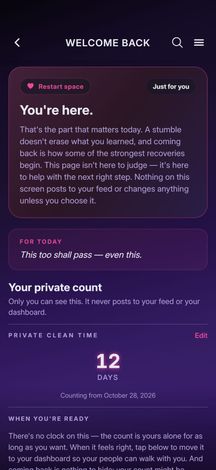
Step 1 of 3: A private counter, apart from Home.
- Private
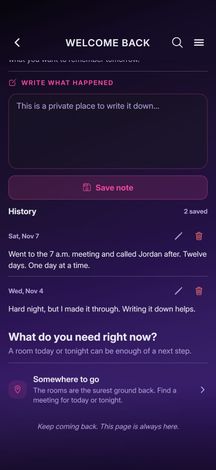
Step 2 of 3: A private journal for the days back.
- Your choice
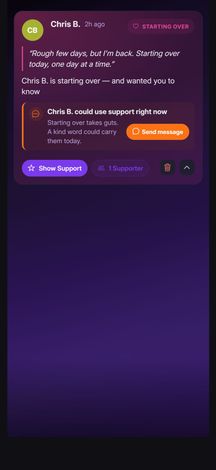
Step 3 of 3: An optional starting-over card. It never has to show the count.
The app follows you outside the app.
Share your clean time as an image, keep it on your home screen, and let reminders bring you back.
- Stays with you
- Your clean date.
- You can share
- A clean-time image, when clean-time sharing is on.
- Live Clean Time, down to the second.
- Home-screen widgets on iPhone and Android, and Clean Time on the iPhone lock screen.
- Sponsorship meetings and 10th Step reminders on your calendar.
- Reminders and notifications you control.
- Quick Links to any page in the app, a group chat or a site you trust.
- Your choice
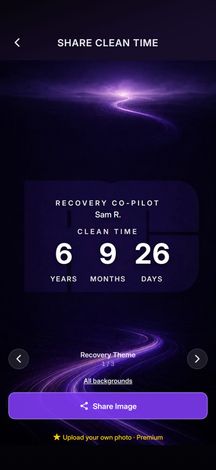
Step 1 of 1: Turn your clean time into a share image, with backgrounds to choose from.
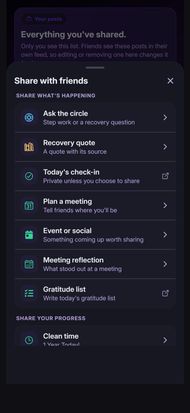
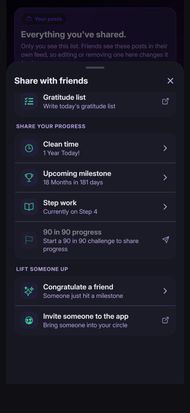
Thirteen ways to share. Each one is your call.
The share sheet keeps every social action in one place. Nothing posts on its own, and a row you can’t use yet says why.
Share what’s happening
- Ask the circleStep work or a recovery question
- Recovery quoteA quote with its source
- Today’s check-inPrivate unless you choose to share
- Plan a meetingTell friends where you’ll be
- Event or socialSomething coming up worth sharing
- Meeting reflectionWhat stood out at a meeting
- Gratitude listWrite today’s gratitude list
Share your progress
- Clean timeOnly when clean-time sharing is on
- Upcoming milestoneYour next milestone and the time to go
- Step workStarted or finished. Never your notes
- 90 in 90 progressStart a 90 in 90 challenge to share progress
Lift someone up
- Congratulate a friendSomeone just hit a milestone
- Invite someone to the appOpens your phone’s share sheet. No contact upload
More choices live inside each tool, right where they matter:
- Check-ins, meditation and gratitude: Save Private or Share to Feed.
- Step work: your notes stay private; only the Step status can be shared.
- 10th Step: your answers stay private; only the completion can be shared.
- 90 in 90: meeting details stay private; the total can be shared.
- Remove anything you’ve shared from your post history, and it leaves friends’ Feeds too.
The whole app, at a glance.
Open any group to see what’s in it.
Home and clean time
- Dashboard: Connection, Today, Reflect and Tools
- Clean time, milestones and anniversaries
- Live Clean Time, to the second
- Clean-time share cards
- Photo and extra share backgroundsPremium
- Home-screen and lock-screen widgets
- Profiles, awards and a sponsorship summary
- True Aura profile ringPremium
- English and Spanish
- Wording for NA, AA, CA, CMA, OA, EDA, GA, Celebrate Recovery and general recovery
- Custom recovery languagePremium
- Full-app themesPremium
- Privacy controls for what friends can see
Check-ins and reflection
- Morning and evening check-ins
- Feelings wheel
- Intentions and evening actions
- Streaks and editable history
- Pattern Insights, private first
- Recovery in Review: week, month and year
- Feeling Flow
Meetings and friends
- NA and AA meeting search
- Links to other fellowships’ meeting finders
- Private or shared meeting plans
- I’ll Be There and Might Attend
- Private Meeting History
- Friend requests, QR codes and invites
- People You May Know
- People Nearby: off by default, general area only
- Friends Feed with filters
- Show Support and private responses
Home Group and service
- More than one Home Group
- Attendance logging
- Service commitments and tasks
- Role pages, from Secretary to H&I
- Treasurer ledger with prudent reserve
- Literature item list and email orders
- GSR Area Report as a PDF
- Home Group Chats
- 10th Step CirclesPremium
Sponsorship
- Sponsor, lineage, sponsorship brothers and sisters, sponsees
- Private notes for each sponsee
- Sponsorship meetings on your calendar
- Pan-and-zoom Sponsorship Tree
- Full lineage and unlimited depthPremium
- Tree image exportPremium
- Contact list as PDF or CSVPremium
Practice
- Steps 1–12, with private notes
- 10th Step: Full and Express
- Custom inventoriesPremium
- 90 in 90
- Meditation timer and history
- Daily Journal
- Gratitude List
- Gratitude Challenge
- Restart: a private count and journal
- Habit and service awards
Readings and daily
- Daily Readings hub
- Recovery Stories
- Share your own story, reviewed before it’s published
- Daily Recovery Word Game
- Crisis and support resources
- Links to fellowship literature
- Quick Links
- Notification inbox
- Help, feedback and account deletion
The core is free.
Clean-time tracking, check-ins and daily tools, meetings, friends and the Feed, Home Group records, service pages and Home Group chats all work without Premium.
Premium adds more.
True Aura rings, custom inventories and 10th Step Circles, the full Sponsorship Tree and its exports, extra share backgrounds, full-app themes, custom recovery language and priority support.
See PremiumTry it free.
Recovery Co-Pilot is free to download on iPhone and Android. No ads.